Claude recently updated its interactive UI, allowing it to stream interactive pages directly into the chat window claude:
At the same time, I came across a project called Generative-UI-MCP. Its author’s idea is refreshingly direct: use the MCP protocol to recreate the machinery that lets Claude generate interactive UIs.
The project itself isn’t complicated, but it breaks apart something that’s usually difficult to explain: what’s actually new about interactive UI like Claude’s; why it isn’t as simple as “AI wrote some frontend code for you”; and whether the real challenge is rendering or the protocol underneath.
Later, I took another look at an actual SSE streaming log and broke down the whole process again. Putting the two side by side makes one thing clearer: Claude-style streaming UI isn’t fundamentally “the model outputs HTML”; it’s “the model continuously emits a UI protocol that the host can consume reliably.”
This article is about exactly that.
It’s a UI Built for Continuous Interaction
The genuinely new part of Claude’s latest interactive UI / Artifacts isn’t that “AI generated a page”—people have been doing that for years. What’s new is that the result remains usable, can continue to interact with the model, and can call tools and update its state.
This is completely different from “AI writes some frontend code that you copy out and run.”
In the old model, the model was the starting point; once generation finished, it was over. In the new model, the model remains an active participant throughout the UI session. A user’s actions in the interface can feed back into the model, and new content returned by the model can update parts of the interface, back and forth.
This loop is roughly:
This loop has to run for the UI to be genuinely “interactive.” HTML with a few buttons isn’t interactive; events have to flow back.
A Real Streaming Output Makes This Very Clear
If you examine an actual SSE stream, you’ll see that the model doesn’t spit out a complete page all at once. Instead, it continuously emits different kinds of content blocks, and the frontend assembles them as they arrive before handing the completed result to the appropriate renderer.
Broken down, it comes to roughly five steps.
First: Load the UI Generation Guidelines
At first, the model doesn’t jump straight to generating a widget. It calls a tool such as visualize:read_me with a very short input:
This step matters. It shows that before it starts “drawing the interface,” the model first retrieves a runtime UI specification. In other words, generation doesn’t just wing it: the model has to know what rules to follow this time.
Second: The Tool Returns an Entire Design System and Streaming Constraints
Several parts of the returned payload are especially important.
First come the module descriptions:
Then the role definition:
Then come its most critical constraints:
There are also ordering rules specifically for streaming rendering:
At face value, this looks like a design specification. From a runtime perspective, though, it’s closer to a generation protocol for producing stable UI messages.
It does several things:
Defines what belongs in the tool and what belongs in natural-language prose
Defines the order in which code should be streamed
Defines which visual effects would disrupt the streaming experience and therefore forbids them
Requires components to fit the host environment, including CSS variables, dark mode, and controlled scripting capabilities
In other words, it isn’t “offering the model some aesthetic advice”; it’s putting the model on a very narrow track.
The Real Key Is the Structure of the Model’s Output, Not HTML
The model then begins calling another tool, such as visualize:show_widget. This part of the stream is especially easy to misread because it looks like a scatter of fragments:
On its own, a fragment like this is barely readable. But it isn’t garbage; it’s part of the arguments for a tool call. The host concatenates each successive partial_json value arriving under the same block, then reconstructs a complete JSON object.
In this case, once reassembled, it looks roughly like this:
Every field here is interesting.
title is the widget’s identifier. loading_messages isn’t decoration; it turns “waiting” into a perceptible generation process. i_have_seen_read_me is like a status acknowledgment, confirming that the model generated the widget after reading the specification.
The actual interface is all in widget_code.
This step exposes the core fact of streaming UI: the model isn’t directly emitting the final page; it’s emitting a UI message that the host can consume.
Why Generative-UI-MCP Looks Tiny but Is Valuable
I had assumed that recreating Claude’s interactive UI would require a lot: a custom renderer, state management, a complete frontend runtime, a component library, and a DSL.
Instead, the core of Generative-UI-MCP is almost counterintuitively minimal:
A
load_ui_guidelinestool that loads UI-generation guidelines on demandA system prompt resource that injects the most basic output constraints up front
There’s no all-encompassing component system and no complex DSL.
This trade-off actually makes the point quite clear: recreating Claude’s interactive UI begins not with “how do we render it?” but with “how do we get the model to output a structure the host can consume reliably?” Rendering comes afterward.
So This Is a Protocol Problem First, Not a Rendering Problem
Claude’s interactive UI has a strong experiential characteristic: widget appearances are stable and predictable. It won’t turn into a code block one time, then natural language with embedded HTML the next.
You can’t rely on the model to “behave itself”; only the protocol can guarantee this.
Generative-UI-MCP exposes precisely this layer:
A widget must be wrapped in a dedicated fence
The fence must contain structured JSON
The
widget_codefield must contain HTML or SVGExplanatory text must be written outside the widget block
Multiple widgets must be split across multiple blocks
The output order must suit streaming rendering
Collectively, these constraints already amount to something very close to a lightweight UI messaging protocol.
What the host does, in essence, is route between those messages.
Why the Guidelines Must Be Loaded on Demand Instead of Being Packed into the Prompt All at Once
The recreation project breaks the UI guidelines into several modules: interactive, chart, mockup, diagram, and art, loading only what’s needed.
This isn’t only about saving tokens; more importantly, different types of UI naturally have different constraints.
Charts have chart rules
Forms have form rules
Mockups have mockup rules
Diagrams have diagram rules
Art follows yet another approach to generation
If everything were packed into one giant prompt, the model would be cluttered with many irrelevant constraints. The value of loading on demand is that the model receives the rules for a given type of UI only when it actually needs to generate that type, which makes its output more stable.
This is the same idea as the real stream earlier, which first sent:
The Hard Part of Streaming Was Never “Faster”; It’s “Framing the Stream as It Arrives”
For many people, streaming means “displaying things faster.” But both the real output and the recreation project show that the host’s real challenge is the parser.
The host can’t simply print tokens one by one. It has to know:
Whether it’s currently looking at ordinary text or a widget block
Whether it’s at the beginning of a block or in a middle fragment
Whether the JSON has closed completely
When text can be displayed directly
When it should enter collection mode
When it should hand the complete
widget_codeto the renderer
The whole process roughly works like this:
Technically, Claude’s feeling of a widget “naturally emerging” isn’t magic; it’s a parser framing the stream as it arrives.
Why Even Details Like <defs>, style Order, and Shadows Need to Be Managed
When you first see a specification like this, it’s easy to think it controls too much:
In SVG,
<defs>must come before the graphicsIn HTML,
stylecomes first andscriptlastGradients, shadows, and blur should be avoided wherever possible
But these rules aren’t about aesthetics; they ensure that every frame the user sees is valid.
The reasons are simple:
If
<defs>hasn’t arrived yet but the graphics render first, markers and clipPaths may be wrong before they’re correctedIf
stylearrives too late, users first see bare UI and then suddenly see the styles fill inGradients, blur, and shadows are more likely to create cross-frame inconsistencies during streaming patches
Claude’s widgets rarely show obvious jitter, not only because the model is stronger but because these constraints suppress instability in the intermediate states.
A Real Widget Reveals What Kind of Frontend This Approach Favors
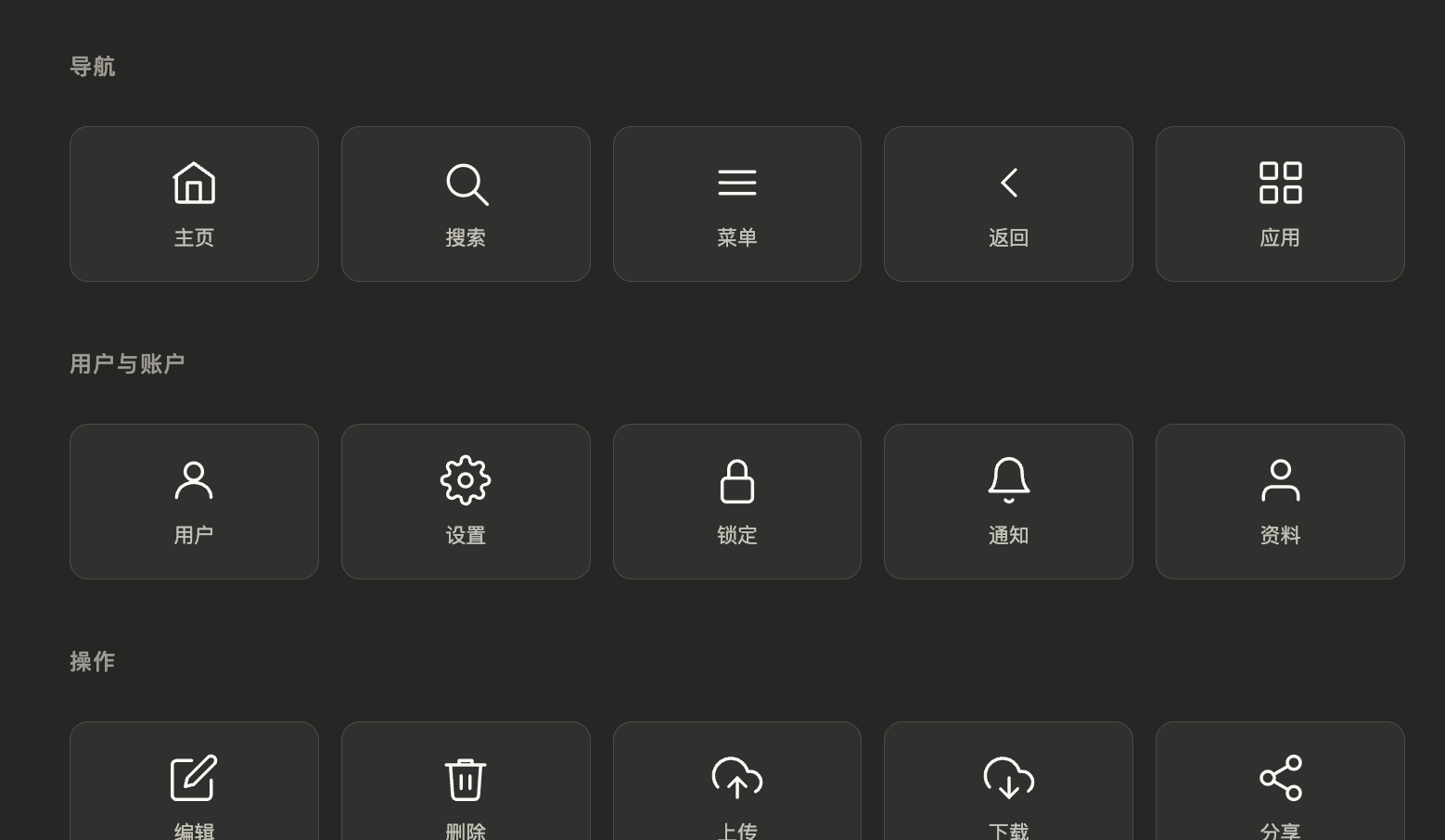
In that actual output, the model ultimately generated an interactive panel containing “25 common UI line icons.” It displayed the icons by category, let the user click to highlight them, and provided feedback at the bottom.
The generated widget_code reveals several distinct trade-offs.
First, the layout is very simple: the core is a stable grid rather than a series of complex responsive techniques.
Second, the styling is extremely light. Everything is based on CSS variables supplied by the host, with no hard-coded colors, so it adapts naturally to dark mode.
Third, the icons are inline SVG and don’t depend on image assets. That makes them easy to stream and easy to switch colors between hover and active states.
Fourth, the JS is very short. It only handles local interactions, with no complex state management, no network requests, and no framework.
This suggests that this kind of streaming UI is more like “an immediate interaction shell within a conversation” than a complete frontend application. Complex logic goes to the model; local interaction stays in the frontend.
It works well for:
Icon panels
Comparison cards
Lightweight filters
Small charts
Interactive explainers
Embedded mockups
But it’s less well suited to:
Extremely complex business forms
Large multi-page applications
State-heavy back-office systems
Real-time collaborative editors
Because its strengths are immediate generation, immediate embedding, and immediate interaction—not serving as a long-running shell for a large application.
One More Important Signal from the Real Stream: Text and UI Must Divide the Work
After the tool finished rendering the widget, the system returned another prompt:
Content rendered and shown to the user. Please do not duplicate the shown content in text because it's already visually represented.
This prompt is extremely valuable. It explicitly tells the model not to repeat in text anything that has already been represented visually.
The natural-language follow-up the model adds afterward is restrained and does only three things:
Summarize what the widget is
Tell the user how to interact with it
Suggest what the user can ask the model to do next
And this line from the earlier readme:
Text goes in your response, visuals go in the tool.
This closes the loop exactly.
That means Claude-style streaming UI doesn’t merely know how to render widgets; it also manages the boundary between the responsibilities of text and visuals.
What You Can’t See in Generative-UI-MCP Is Actually the Hardest Part to Productize
Honestly, after working through the recreation project, it becomes clearer which parts of the original system can’t be filled in by the protocol alone.
1. Sandbox
Model-generated HTML/JS can’t be allowed to run unrestricted. It needs iframe isolation, an allowlist for CDNs, script capability restrictions, and resource permission boundaries.
Otherwise, as soon as the model produces a malicious script, the host gets into trouble.
2. Action Protocol
What happens after a user clicks can’t be left to the model, which might write an arbitrary onclick and decide the logic as it pleases. A mature design would have the host define a unified action schema, for example:
filter_changedsubmit_formrequest_refreshselect_item
The widget only emits actions; the host decides whether to handle them locally, call a tool, or ask the model again.
3. Incremental Patches
During multi-turn conversations, Claude often updates a widget by changing part of it rather than regenerating the whole thing. That requires the host to maintain state and the model to know when it should return a patch and when it should return a complete replacement.
The largest gap between the demo and a product-grade experience probably lies here.
The One Sentence Worth Remembering
The biggest takeaway from Generative-UI-MCP isn’t learning some new trick; it’s coming away with a much clearer realization:
Building interactive UI has never been about solving rendering first. It’s about solving the protocol first.
Once the protocol is stable, everything downstream becomes possible:
A streaming parser
Widget rendering
Sandboxed execution
Event feedback
Attaching tools
Incremental updates
Claude has essentially got this whole chain working, so it doesn’t feel like a demo. Generative-UI-MCP has open-sourced the logic at the very front of that chain, making the idea sufficiently understandable, discussable, and decomposable for the first time.
Looking back at those seemingly scattered streaming fragments—especially the recurring input_json_delta, widget_code, and tool_use—you no longer see them as mere noise. They are the traces left by this entire generative UI protocol at runtime.
Appendix: The Original Prompts That Actually Appeared in This Stream
The following section isn’t an edited template; it’s the original prompt and specification text reconstructed from an actual streaming output.

