How Claude-Style Streaming UI Actually Works
Claude recently updated its interactive UI, enabling streaming output of interactive pages directly in the chat box:
There's also a project called Generative-UI-MCP — the author's idea is straightforward: replicate what Claude does with generating interactive UI using the MCP protocol.
This project itself isn't complex, but it clarifies something that's usually hard to explain: what makes Claude's interactive UI truly new; why it's not as simple as "AI writes some frontend code for you"; and whether the core challenge is a rendering problem or a protocol problem.
I later re-broke down the entire process while looking at a real SSE streaming output log. After lining up both sides, it becomes clearer: Claude-style streaming UI is fundamentally not "model outputs HTML," but rather "model continuously outputs a UI protocol that the host can reliably consume."
That's what this article is about.
It's a Continuously Interactive UI Page
What makes Claude's interactive UI / Artifacts truly new isn't "AI generates a page" — people have been doing that for a while. The new part is: the generated content can still be used, can still interact with the model, can still have tools attached and update state.
This is completely different from "AI wrote some frontend code, you copy it out and run it."
In the old approach, the model was the starting point, and it was done after generation. In the new approach, the model is a continuous participant in this UI session. User operations on the interface can go back to the model, and the model's new content can partially update the interface, looping back and forth.
This loop looks roughly like this:
This loop running smoothly is what makes it truly "interactive." An HTML with a few buttons isn't interactive — event flow returning is what makes it interactive.
A Real Streaming Output Makes This Very Clear
Looking at a real SSE streaming output, you'll find the model doesn't spit out a complete page all at once. Instead, it continuously outputs different types of content blocks in the stream, and the frontend receives and assembles them piece by piece before handing them to the corresponding renderer.
Broken down, it's about five steps.
Step 1: Load the UI Generation Spec First
At the beginning, the model doesn't directly generate widgets. Instead, it calls a tool like visualize:read_me with very short input parameters:
{

"modules": ["diagram", "interactive"]

}
This step is crucial. It shows that before actually "drawing the interface," the model first fetches a runtime UI specification. In other words, generation isn't running naked — the model first needs to know what rules to follow this time.
Step 2: Tool Returns a Complete Design System and Streaming Output Constraints
In this returned content, there are several particularly critical sections.
First, the module descriptions:
Call read_me again with the modules parameter to load detailed guidance:

- `diagram` — SVG flowcharts, structural diagrams, illustrative diagrams

- `mockup` — UI mockups, forms, cards, dashboards

- `interactive` — interactive explainers with controls

- `chart` — charts, data analysis, geographic maps (Chart.js, D3 choropleth)

- `art` — illustration and generative art
Then the role definition:
You create rich visual content — SVG diagrams/illustrations and HTML interactive widgets — that renders inline in conversation. The best output feels like a natural extension of the chat.
And then its most critical constraints:
### Philosophy

- Seamless: Users shouldn't notice where claude.ai ends and your widget begins.

- Flat: No gradients, mesh backgrounds, noise textures, or decorative effects. Clean flat surfaces.

- Compact: Show the essential inline. Explain the rest in text.

- Text goes in your response, visuals go in the tool.
And the sequential rules specifically for streaming rendering:
### Streaming

Output streams token-by-token. Structure code so useful content appears early.

- HTML: <style> (short) → content HTML → <script> last.

- SVG: <defs> (markers) → visual elements immediately.

- Prefer inline style="..." over <style> blocks.

- Gradients, shadows, and blur flash during streaming DOM diffs. Use solid flat fills instead.
At surface level, this looks like a design spec; but from an execution perspective, it's more like a generation protocol that "makes the model output stable UI messages."
It's doing several things:
Defining what should go in the tool vs. what should go in natural language
Defining the order in which code should be streamed out
Defining which visual effects will break the streaming experience, so they're prohibited
Defining that components must adapt to the host environment (CSS variables, dark mode, controlled scripting capabilities)
In other words, this isn't "giving the model some aesthetic suggestions" — it's putting the model on a narrow track.
The Real Key Isn't HTML, But the Structure of Model Output
Then the model starts calling another tool, like visualize:show_widget. This part of the stream is easiest to misunderstand, because it looks like a bunch of fragmented pieces:
event: content_block_delta

data: {"type":"content_block_delta","index":2,"delta":{"type":"input_json_delta","partial_json":"-2-2L"}}
Looking at such fragments alone, there's almost no readability. But they're not garbled text — they're part of the tool call parameters. The host assembles the incoming partial_json under the same block continuously, then reconstructs a complete JSON.
Like this time, after reassembly, it looks roughly like this:
{

"title": "ui_icons_outline",

"loading_messages": [

"Sketching icon paths...",

"Adding hover magic...",

"Lining up the grid..."

],

"i_have_seen_read_me": true,

"widget_code": "..."

}
Each field here is interesting.
title is the identifier for this widget. loading_messages isn't decoration — it's converting "waiting" into a perceivable generation process. i_have_seen_read_me is like a state confirmation, indicating the model generated this after having already read the specification.
And the actual interface all goes into widget_code.
This step reveals the core truth of streaming UI: the model doesn't directly output the final page — it's outputting a UI message that the host can consume.
Why Generative-UI-MCP Seems Small But Is Valuable
I initially thought replicating Claude's interactive UI would require many things: custom renderers, state management, complete frontend runtime, component libraries, DSL.
As it turns out, the core of Generative-UI-MCP is minimalist to the point of being counterintuitive:
A
load_ui_guidelinestool that loads UI generation specs on demandA system prompt resource that injects the most basic output constraints upfront
No comprehensive component system, no complex DSL.
This tradeoff actually illustrates the point well: replicating Claude's interactive UI, the first thing to solve isn't "how to render," but "how to make the model output a structure the host can stably consume." Rendering comes after.
So This Is Primarily a Protocol Problem, Not a Rendering Problem
Claude's interactive UI has a strong experience characteristic: widgets appear stably and predictably. It won't be a code block this time and natural language with embedded HTML next time.
To achieve this, you can't rely on the model being "conscious" — you can only rely on the protocol.
What Generative-UI-MCP exposes is exactly this layer:
Widgets must be wrapped in dedicated fences
The fence must contain structured JSON
The
widget_codefield holds HTML or SVGExplanatory text must be written outside the widget block
Multiple widgets must be split into multiple blocks
Output order must be suitable for streaming rendering
These constraints combined are essentially already quite close to a lightweight UI messaging protocol.
What the host does is essentially route between these messages.
Why Specs Must Be Loaded On Demand, Not All Pushed Into Prompt at Once
The replication project splits UI specs into several modules: interactive, chart, mockup, diagram, art, loading what's needed.
This isn't just to save tokens — the more critical point is: constraints for different UI types are inherently different.
Charts have chart rules
Forms have form rules
Mockups have mockup rules
Diagrams have diagram rules
Art is yet another generation approach
If you stuff everything into one big prompt, the model gets polluted by many irrelevant constraints. The value of on-demand loading is: only when actually generating a certain type of UI does the model get that type of rule, making output more stable.
This is actually the same approach as the real stream earlier that first passed:
{

"modules": ["diagram", "interactive"]

}
The Difficulty of Streaming Was Never "Faster," But "Partitioning Frames While Streaming"
Many people's understanding of streaming stays at "display faster." But as both the real output and the replication project show, what the host really needs to solve is the parser.
The host can't just print tokens one by one. It must know:
Is the current output plain text or a widget block?
Is the current output the start of a block or a middle fragment?
Is the JSON completely closed?
When can text be displayed directly?
When should it enter collection mode?
When should the complete
widget_codebe handed to the renderer?
The whole process looks roughly like this:
That feeling of widgets naturally "emerging" in Claude isn't technically magic — it's the parser partitioning frames while streaming.
Why Even Details Like <defs>, Style Order, and Shadows Must Be Controlled
The first time seeing such specs, it's easy to think it controls too much detail:
In SVG,
<defs>must come before graphicsIn HTML,
stylefirst,scriptlastAvoid gradients, shadows, blur as much as possible
But these rules aren't controlling aesthetics — they're controlling whether every frame the user sees is valid.
The reason is simple:
If
<defs>hasn't arrived yet but graphics come out first, markers and clipPaths will be wrong then correctIf
stylearrives too late, users see bare UI first, then styles suddenly appearGradients, blur, and shadows are more prone to cross-frame inconsistency during streaming patch processes
The reason Claude's widgets rarely have obvious jitter isn't just because the model is stronger — it's because this set of constraints suppresses instability in intermediate states.
From a Real Widget, What Kind of Frontend This Approach Favors
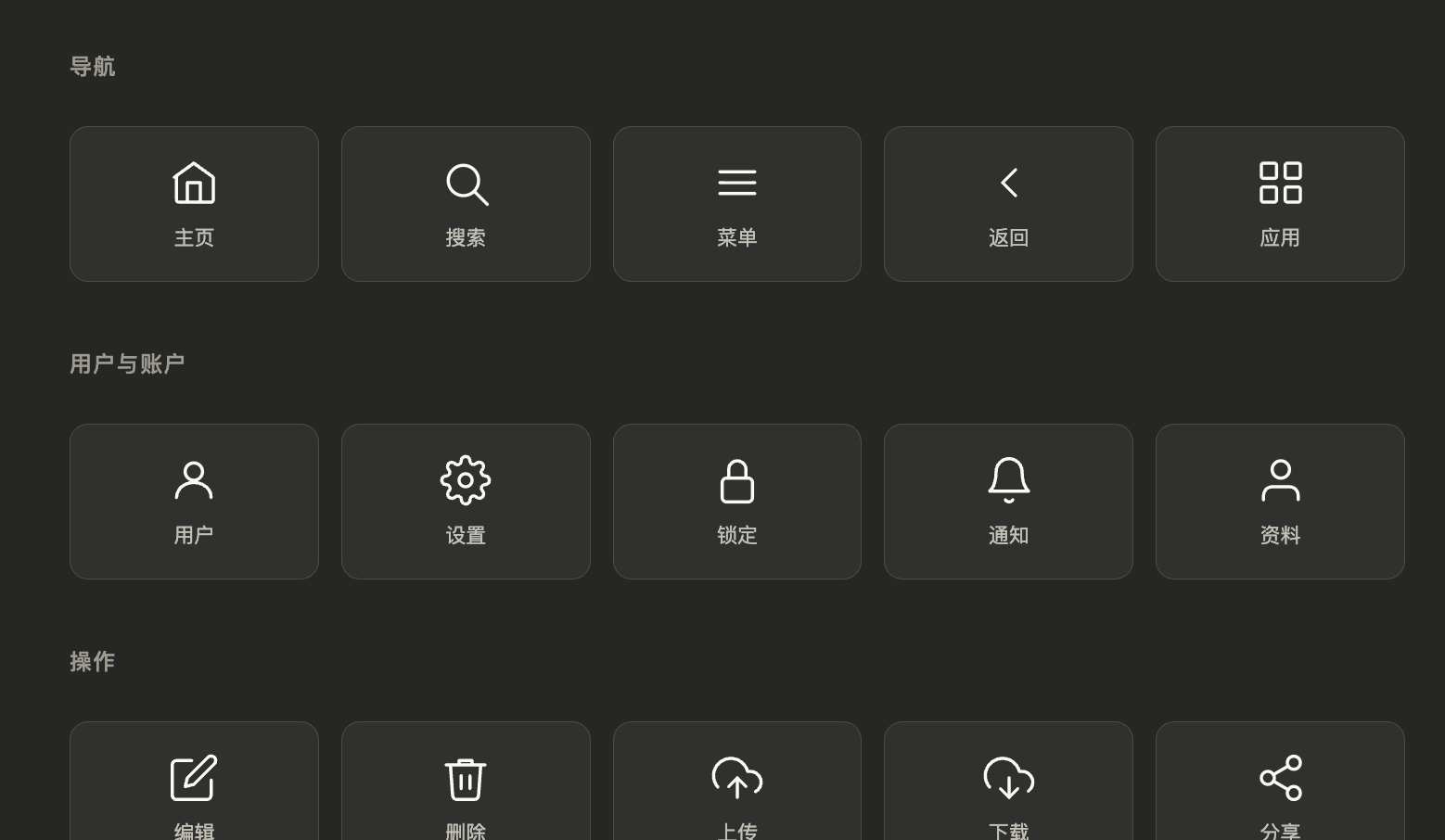
In that real output, the model ultimately generated an interactive panel of "25 common UI outline icons." It displays icons by category, highlights on click, and gives feedback at the bottom.
From the generated widget_code, several very clear trade-offs can be seen.
First, the layout is very simple — the core is a stable grid, not complex responsive techniques.
Second, the styles are extremely lightweight — all based on CSS variables from the host, no hardcoded colors, naturally adapted to dark mode.
Third, icons are inline SVGs directly, not relying on image resources — this makes streaming output easier and also makes color switching during hover and active states easier.
Fourth, the JS is very short — only doing local interaction, no complex state management, no network requests, no framework imports.
This shows this kind of streaming UI is more like "instant interactive shells in conversation," not complete frontend applications. Complex logic is left to the model, local interaction stays in the frontend.
It's well suited for:
Icon panels
Comparison cards
Lightweight filters
Small charts
Interactive explainers
Embedded mockups
But not so well suited for:
Very complex business forms
Large multi-page applications
Heavy state admin dashboards
Real-time collaborative editors
Because its strength is instant generation, instant embedding, instant interaction — not a long-running large application shell.
There's Also a Very Important Signal in the Real Stream: Text and UI Must Have Clear Roles
After the tool renders the widget, the system returns another prompt:
Content rendered and shown to the user. Please do not duplicate the shown content in text because it's already visually represented.
This prompt is very valuable. It explicitly tells the model: don't repeat what's already been rendered.
The natural language the model adds afterward is also restrained, only doing three things:
Summarizing what this widget is
Telling the user how to operate it
Prompting what else the user can have the model do next
This exactly closes the loop with that line from the readme:
Text goes in your response, visuals go in the tool.
In other words, Claude-style streaming UI isn't just "can render widgets" — it's also managing the boundary of responsibility between text and visuals.
The Parts Generative-UI-MCP Can't Show Are Actually the Hardest Parts of Productization
Honestly, after seeing this replication project, it becomes clearer what parts of the original system can't be filled in by protocol alone.
1. Sandbox
The HTML/JS generated by the model can't run naked. There must be iframe isolation, whitelist CDNs, script capability limits, and resource permission boundaries.
Otherwise, if the model generates a malicious script, the host will have problems.
2. Action Protocol
What happens after a user clicks can't be decided by the model freely writing onclick and deciding logic arbitrarily. A mature design is more like the host first defining a unified action schema, like:
filter_changedsubmit_formrequest_refreshselect_item
Widgets only send actions — the host decides whether to handle locally, call tools, or ask the model again.
3. Incremental Patch
When Claude updates widgets across multiple rounds, it's often not full regeneration but partial updates. This requires the host to maintain state, and also requires the model to know when to return a patch vs. when to return a full replacement.
The gap between demo and product-grade experience is probably greatest here.
One Sentence Worth Remembering
The biggest takeaway from looking at Generative-UI-MCP isn't learning some new trick, but more clearly realizing:
Building interactive UI — this has never been about solving rendering first, but about solving protocol first.
Only when the protocol is stable do the following things become possible:
Streaming parser
Widget rendering
Sandbox execution
Event flow back
Tool attachment
Incremental updates
Claude has basically run through this entire chain, which is why it doesn't feel like a demo when using it. Generative-UI-MCP has open-sourced the very first part of this chain, so for the first time this becomes understandable enough, discussable enough, and breakable-down enough.
Looking back at those seemingly fragmented streaming pieces — especially the recurring input_json_delta, widget_code, tool_use — they no longer seem like just noise. They are actually the traces left by this entire generative UI protocol at runtime.
Appendix: Original Prompts That Actually Appeared in This Stream
This next part isn't organized templates — it's the original prompts and spec text还原ed from the real streaming output.
1. Module Selection
{

"modules": [

"diagram",

"interactive"

]

}
2. Specification Text Returned by visualize:read_me
# Imagine — Visual Creation Suite


## Modules

Call read_me again with the modules parameter to load detailed guidance:

- `diagram` — SVG flowcharts, structural diagrams, illustrative diagrams

- `mockup` — UI mockups, forms, cards, dashboards

- `interactive` — interactive explainers with controls

- `chart` — charts, data analysis, geographic maps (Chart.js, D3 choropleth)

- `art` — illustration and generative art

Pick the closest fit. The module includes all relevant design guidance.


**Complexity budget — hard limits:**

- Box subtitles: ≤5 words. Detail goes in click-through (`sendPrompt`) or the prose below — not the box.

- Colors: ≤2 ramps per diagram. If colors encode meaning (states, tiers), add a 1-line legend. Otherwise use one neutral ramp.

- Horizontal tier: ≤4 boxes at full width (~140px each). 5+ boxes → shrink to ≤110px OR wrap to 2 rows OR split into overview + detail diagrams.


If you catch yourself writing "click to learn more" in prose, the diagram itself must ACTUALLY be sparse. Don't promise brevity then front-load everything.


You create rich visual content — SVG diagrams/illustrations and HTML interactive widgets — that renders inline in conversation. The best output feels like a natural extension of the chat.


## Core Design System


These rules apply to ALL use cases.


### Philosophy

- **Seamless**: Users shouldn't notice where claude.ai ends and your widget begins.

- **Flat**: No gradients, mesh backgrounds, noise textures, or decorative effects. Clean flat surfaces.

- **Compact**: Show the essential inline. Explain the rest in text.

- **Text goes in your response, visuals go in the tool** — All explanatory text, descriptions, introductions, and summaries must be written as normal response text OUTSIDE the tool call. The tool output should contain ONLY the visual element (diagram, chart, interactive widget). Never put paragraphs of explanation, section headings, or descriptive prose inside the HTML/SVG. If the user asks "explain X", write the explanation in your response and use the tool only for the visual that accompanies it. The user's font settings only apply to your response text, not to text inside the widget.


### Streaming

Output streams token-by-token. Structure code so useful content appears early.

- **HTML**: `<style>` (short) → content HTML → `<script>` last.

- **SVG**: `<defs>` (markers) → visual elements immediately.

- Prefer inline `style="..."` over `<style>` blocks — inputs/controls must look correct mid-stream.

- Keep `<style>` under ~15 lines. Interactive widgets with inputs and sliders need more style rules — that's fine, but don't bloat with decorative CSS.

- Gradients, shadows, and blur flash during streaming DOM diffs. Use solid flat fills instead.


### Rules

- No `<!-- comments -->` or `/* comments */` (waste tokens, break streaming)

- No font-size below 11px

- No emoji — use CSS shapes or SVG paths

- No gradients, drop shadows, blur, glow, or neon effects

- No dark/colored backgrounds on outer containers (transparent only — host provides the bg)

- **Typography**: The default font is Anthropic Sans. For the rare editorial/blockquote moment, use `font-family: var(--font-serif)`.

- **Headings**: h1 = 22px, h2 = 18px, h3 = 16px — all `font-weight: 500`. Heading color is pre-set to `var(--color-text-primary)` — don't override it. Body text = 16px, weight 400, `line-height: 1.7`. **Two weights only: 400 regular, 500 bold.** Never use 600 or 700 — they look heavy against the host UI.

- **Sentence case** always. Never Title Case, never ALL CAPS. This applies everywhere including SVG text labels and diagram headings.

- **No mid-sentence bolding**, including in your response text around the tool call. Entity names, class names, function names go in `code style` not **bold**. Bold is for headings and labels only.

- The widget container is `display: block; width: 100%`. Your HTML fills it naturally — no wrapper div needed. Just start with your content directly. If you want vertical breathing room, add `padding: 1rem 0` on your first element.

- Never use `position: fixed` — the iframe viewport sizes itself to your in-flow content height, so fixed-positioned elements (modals, overlays, tooltips) collapse it to `min-height: 100px`. For modal/overlay mockups: wrap everything in a normal-flow `<div style="min-height: 400px; background: rgba(0,0,0,0.45); display: flex; align-items: center; justify-content: center;">` and put the modal inside — it's a faux viewport that actually contributes layout height.

- No DOCTYPE, `<html>`, `<head>`, or `<body>` — just content fragments.

- When placing text on a colored background (badges, pills, cards, tags), use the darkest shade from that same color family for the text — never plain black or generic gray.

- **Corners**: use `border-radius: var(--border-radius-md)` (or `-lg` for cards) in HTML. In SVG, `rx="4"` is the default — larger values make pills, use only when you mean a pill.

- **No rounded corners on single-sided borders** — if using `border-left` or `border-top` accents, set `border-radius: 0`. Rounded corners only work with full borders on all sides.

- **No titles or prose inside the tool output** — see Philosophy above.

- **Icon sizing**: When using emoji or inline SVG icons, explicitly set `font-size: 16px` for emoji or `width: 16px; height: 16px` for SVG icons. Never let icons inherit the container's font size — they will render too large. For larger decorative icons, use 24px max.

- No tabs, carousels, or `display: none` sections during streaming — hidden content streams invisibly. Show all content stacked vertically. (Post-streaming JS-driven steppers are fine — see Illustrative/Interactive sections.)

- No nested scrolling — auto-fit height.

- Scripts execute after streaming — load libraries via `<script src="https://cdnjs.cloudflare.com/ajax/libs/...">` (UMD globals), then use the global in a plain `<script>` that follows.

- **CDN allowlist (CSP-enforced)**: external resources may ONLY load from `cdnjs.cloudflare.com`, `esm.sh`, `cdn.jsdelivr.net`, `unpkg.com`. All other origins are blocked by the sandbox — the request silently fails.


### CSS Variables

**Backgrounds**: `--color-background-primary` (white), `-secondary` (surfaces), `-tertiary` (page bg), `-info`, `-danger`, `-success`, `-warning`

**Text**: `--color-text-primary` (black), `-secondary` (muted), `-tertiary` (hints), `-info`, `-danger`, `-success`, `-warning`

**Borders**: `--color-border-tertiary` (0.15α, default), `-secondary` (0.3α, hover), `-primary` (0.4α), semantic `-info/-danger/-success/-warning`

**Typography**: `--font-sans`, `--font-serif`, `--font-mono`

**Layout**: `--border-radius-md` (8px), `--border-radius-lg` (12px — preferred for most components), `--border-radius-xl` (16px)

All auto-adapt to light/dark mode. For custom colors in HTML, use CSS variables.


**Dark mode is mandatory** — every color must work in both modes:

- In SVG: use the pre-built color classes (`c-blue`, `c-teal`, `c-amber`, etc.) for colored nodes — they handle light/dark mode automatically. Never write `<style>` blocks for colors.

- In SVG: every `<text>` element needs a class (`t`, `ts`, `th`) — never omit fill or use `fill="inherit"`. Inside a `c-{color}` parent, text classes auto-adjust to the ramp.

- In HTML: always use CSS variables (--color-text-primary, --color-text-secondary) for text. Never hardcode colors like color: #333 — invisible in dark mode.

- Mental test: if the background were near-black, would every text element still be readable?


### sendPrompt(text)

A global function that sends a message to chat as if the user typed it. Use it when the user's next step benefits from Claude thinking. Handle filtering, sorting, toggling, and calculations in JS instead.


### Links

`<a href="https://...">` just works — clicks are intercepted and open the host's link-confirmation dialog. Or call `openLink(url)` directly.


## When nothing fits

Pick the closest use case below and adapt. When nothing fits cleanly:

- Default to editorial layout if the content is explanatory

- Default to card layout if the content is a bounded object

- All core design system rules still apply

- Use `sendPrompt()` for any action that benefits from Claude thinking
3. Real Parameters for visualize:show_widget
{

"title": "ui_icons_outline",

"loading_messages": [

"Sketching icon paths...",

"Adding hover magic...",

"Lining up the grid..."

],

"i_have_seen_read_me": true,

"widget_code": "<style>...</style><div>...</div><script>...</script>"

}
4. Real Prompt After Tool Rendering
Content rendered and shown to the user. Please do not duplicate the shown content in text because it's already visually represented.


[This tool call rendered an interactive widget in the chat. The user can already see the result — do not repeat it in text or with another visualization tool.]

